Unofficial Guide Into 3D Printing & Safety
I am NOT an expert in 3D printing, nor am I an industrial or occupational hygienist. This guide is based on my own experiences and research, and I am NOT responsible for any injury or damage that may occur from following it. Please do your own research and take proper safety precautions when working with 3D printers and related equipment.
Optional Read
My Yapping Session
I'm just going to yap a bit about how I got into 3D printing, what I've enjoyed so far, and what I plan to do next.
I think what really pulled me into the hobby was my habit of looking at things and thinking: I could probably fix that. I wonder if I could make this better. How cool would it be if I could make that? But if you had asked me a few years ago what I knew about 3D printers, then all I could tell you was that it looked cool and that Creality had some crazy machines. Fast-forward to now, I've finally jumped into the hobby—and honestly, I've been loving every bit of it. There's always so much to learn, but I guess that's to be expected when you pick up two different hobbies at once (3D printing and modeling).
For me, it's the magic of being able to imagine something, bring it to life, and have it in the palm of your hand in the next hour. And it's not just about what I can make- it's also been so inspiring to see all of the incredible designs all over the internet.
I don't have an exact timeline for what I want to do next, but my plan is to get better at 3D modeling, post some of my own designs, and eventually upgrade my printer. I also want to participate in a contest, but that's for much later. That's all for my yap session—enjoy the rest of this (unofficial) guide!
And if you somehow haven't seen any of Scott Yu-Jan's videos, here's the one that got me into printing:
The Basics
Choosing Your Printer
There are two main types of 3D printers you can choose from:
1. FDM (Fused Deposition Modeling)
2. SLA (Stereolithography)
FDM printers melt plastic filament such as PLA, ABS, or PETG into layers to build a 3D object. SLA printers, on the other hand, use a laser to cure liquid resin (basically liquid plastic) into solid shapes. FDM printers are generally cheaper and easier to use, while SLA printers can produce higher-quality prints but are more expensive and require more maintenance. Since there are so many brands and models available, it's important to do your research and pick one that fits your needs and budget.
If you want to learn how 3D printers work and enjoy tinkering, I'd recommend starting with a Creality printer. But if you just want something that works right out of the box, then the Bambu Lab A1 series is a great choice. Personally, I went with the Bambu Lab A1 Mini.
Filaments
Types of Filament
If you go with an FDM printer, you'll need filament to print with. The most common (and safest) option for beginners is PLA (Polylactic Acid). It's biodegradable and one of the least toxic filaments available.
Other popular filaments include:
1. ABS (Acrylonitrile Butadiene Styrene)
2. PETG (Polyethylene Terephthalate Glycol)
3. ASA (Acrylonitrile Styrene Acrylate)
4. TPU (Thermoplastic Polyurethane)
5. Nylon
Each material has its own properties and best use cases, so it's important to do your research and find one that fits your needs. Here's a quick rundown: PLA is great for beginners and general printing. ABS is more durable and heat-resistant, but emits very harmful fumes. PETG is a good middle ground between PLA and ABS. ASA is basically a stronger, weatherproof version of ABS. Nylon is an even stronger and more flexible version of ASA, but is also harder to print with. Lastly, TPU is a flexible, rubber-like filament, making it perfect for parts that need to bend, stretch, or take a beating without breaking.
On top of that, many of these filaments come in different variations, like PLA+, PLA-CF, PETG+, or PETG-HF. Each subtype generally serves different purposes, so make sure you do your own research to find which one best fits your needs.
I would also recommend watching Zack Freedman's video if you want to learn about all of the different filaments:
Drying Your Filament
Depending on the type of filament you use, you might need to dry it before printing. Some filaments are more prone to absorbing moisture, which can lead to messy prints or even the dreaded blob of death.
The easiest way to keep filament dry is to store it in plastic cereal containers with microwavable silica packets. Another alternative, but more expensive option is to use dedicated units like Creality's Dryer Box or Bambu Lab's AMS Pro 2, which can store and dry your filaments.
Multicolor Printing
Some printers, like the Prusa XL or Bambu series, give you the option to print with multiple filament colors. Of course, the added benefits make it more expensive, and in many cases you won't need it—especially if you plan on sanding or painting your prints anyway.
The best way to decide if multicolor printing is worth it or not is to go onto Printables, Thingiverse, or Makerworld and favorite the models you'd actually want to print. If most of them don't use multiple colors, then you can probably skip the add-on. If they do, then go for it!
Safety First
Ventilation vs. Filtration
Ventilation
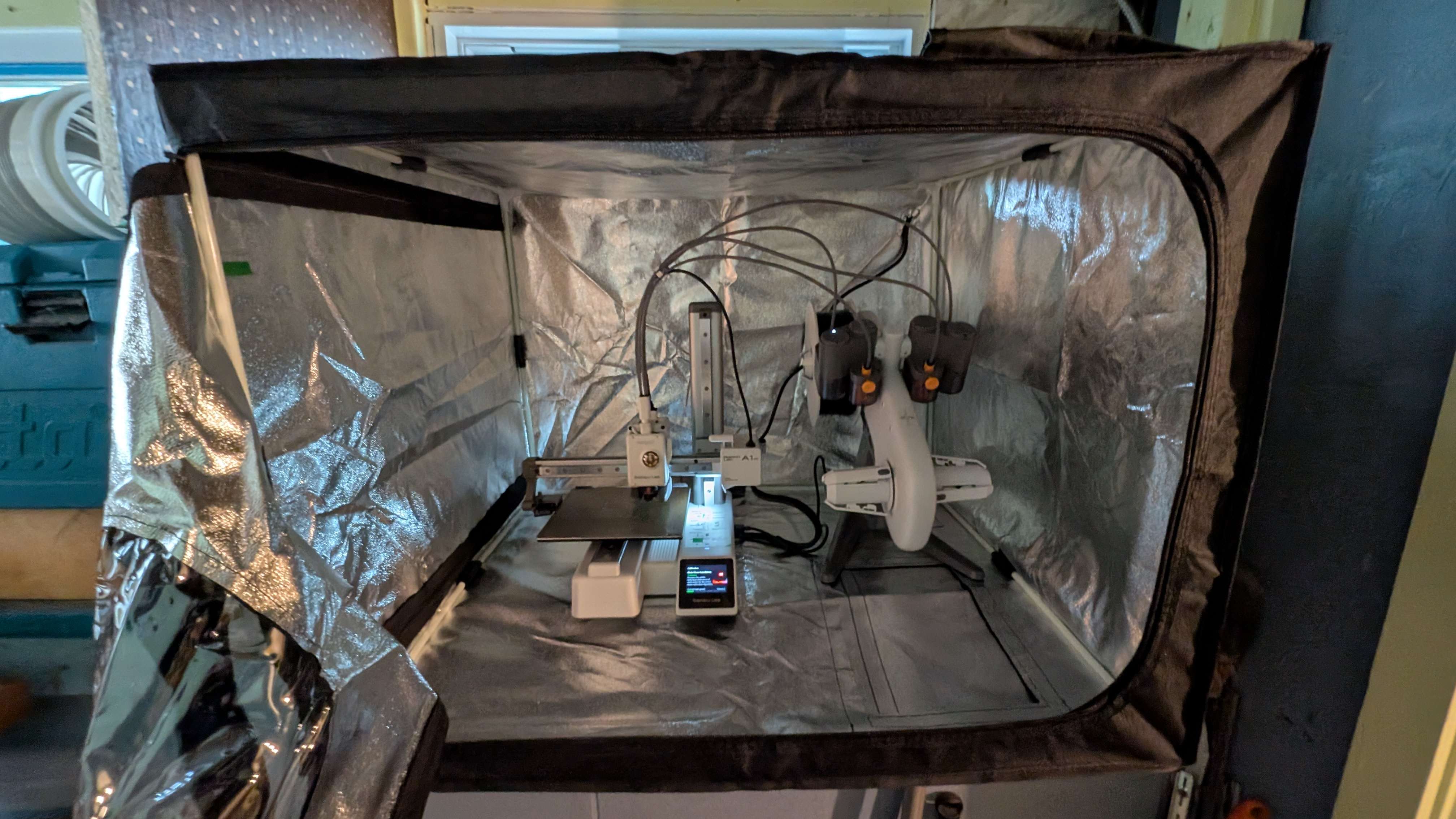
Ventilation involves using a fan or exhaust system to remove the fumes and particles from the air and vent them outside. Ideally, you should be printing in a well-ventilated area or even outside if possible. If this is not an option for you, then you can use a filtration system to remove as many of the harmful particles and fumes as possible.
I HIGHLY recommend watching Aris Alder's video on ventilation below. If you have bad asthma or some sort of condition, I would say GO ALL OUT on ventilation and filtration, even if you're only printing with PLA. You only get one set of lungs.
Filtration
This should be your LAST option if you want to 3D print. Filtering is more expensive to setup and maintain. If you live in a windowless shoebox or a maximum security prison, you can buy an Air Purifier to remove some of the UFPs (ultrafine particles) and VoCs (volatile organic compounds) that come out of the printing process before pushing air back into the room. Look for purifiers with HEPA and Carbon Filters. Honestly, I'm not even sure how effective this is, so I would not recommend it if this is your only option.
I think the ideal system would be to combine both systems: ventilate from your enclosure while also running an air purifier your room (especially if you're printing from your bedroom or personal space). But if you have a spare room with proper ventilation, that'd be even better.
Fans and Enclosures
Fan Speeds and Pressure
Depending on how you're going to vent or filter out the nasties from your 3D printer, you're either going to need a meth-lab level exhaust fan or simple computer one. If you have a short duct venting outside or a thin filter, then you can use a simple computer fan like the Noctua A8 or IPPC-3000 for your enclosure. But if you're using more heavy-duty filaments like ABS and Nylon, or resin printing, then you should go all out and get an inline-duct exhaust fan. Make sure to consider the fan speeds and pressure when you're buying a fan for your enclosure and filters. You can't just slap a random fan onto a random filter—make sure they actually match up.
- Higher fan speed = less time needed to vent or filter
- Higher fan pressure = more force to push the air through filters
Maker Mike has some great videos for this that I would highly recommend watching:
That's It!
Start Printing!
You've got your printer, got your filaments, and setup your enclosure. You're finally ready to get into the fun part, printing (and maybe modeling)! Honestly, I don't have much of an opinion or guide here, use whatever software works for you! Personally, I've been using Fusion360 to model everything, but I've heard that onShape is a good alternative as well.
Common Problems & Fixes
I wanted to make a section for common problems like the blob of death, poor bed adhesion, and more. Luckily, I haven't run into any of these issues… yet. But if I do, I'll post some solutions here as well.Lingering Fumes
If you still smell or taste lingering fumes even though your printer is enclosed, your fans on, and your tent is shrinking (from negative pressure), then you might not have enough air coming into the enclosure to properly vent/filter out. I'm not a scientist, but what's worked for me is opening a small hole (from the opposite side of my exhaust fan) to allow more air to come in. Ideally, your enclosure should still have enough negative pressure (tent should shrink a bit) to prevent fumes from going all over the place, but not too much that fumes will linger.
You can also either add a passive intake fan on the opposite side of your enclosure or slow down your exhaust fan speed to fix this (assuming your fan came with a controller). The general idea here is that if air is being pushed out, then you also need fresh air to be pushed in to replace it.
A1 Mini WiFi Problems
This is just one of the potential solutions to your A1 Mini not connecting to your home network. For me, I found out that the A1 Mini can only connect to Wifi networks at 2.4 GHz, and for whatever reason, my network upgraded itself to 5.0 (still not sure what caused this). If you're experiencing a similiar issue, then all you have to do is to log into your home network and enable/switch to a 2.4 GHz SSID. If your router can’t broadcast both bands, then create a separate 2.4 GHz network or use a spare/travel router and connect the printer to that.
Concerns
Likewise with the Common Problems & Fixes Section, I wanted to add a Section to address any concerns beyond the printers. If you have any concerns and answers, feel free to contribute!
Food Safety
As far as I know, 3D-printed objects aren't food-safe. The filament you print with (usually PLA) can be graded as food-safe, but the layer lines from printing will say otherwise. Those lines and small gaps can trap bacteria and make the object difficult to clean. So while you could drink from a 3D-printed cup once, you wouldn't really be able to clean it well enough for repeated use. If anyone has actually found a way to properly clean their 3D prints, please let me know too.